

3DLive GDML interface for Vericut

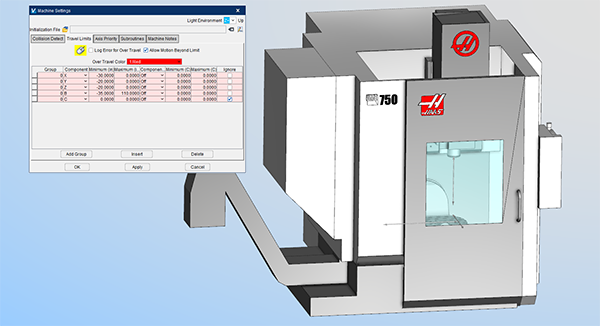
CGTech say that its Vericut software can now read in GDML files with a new 3DLive interface. GDML is an application-independent geometry description format based on XML. 3DLive is available in MachiningCloud for products that require kinematics, such as machine tools and work-holding devices.

MachiningCloud is renowned for its ability to provide 3D models of cutting tools for use in Vericut and other related CADCAM and simulation software. DMG Mori, Haas, Mazak, Kennametal and Kurt Workholding are among the first to supply GDML machine-tool driven-turret units and fixture models to MachiningCloud.

Vericut is the first software of its kind to support the import of 3DLive files for use in verifying, simulating and optimising NC programs. This enhancement provides Vericut users with the ability to read in 3DLive data for CNC machines, work-holding fixtures and cutting tool holders for use in simulations. This capability eliminates having to measure and model the components by traditional means or request 3D models from the machine-tool builder.

“What has traditionally been a challenging and time-consuming procedure to obtain machine-specific information and manually build digital twin machines, can now be done quickly and easily in Vericut using the new 3DLive interface to read information-rich geometry data,” says Gene Granata, Vericut product manager.

The 3DLive catalogue in MachiningCloud currently contains over 8700 products. 3DLive files contain kinematics, travel limits, minimum and maximum feed rates, initial machine location, and 3D geometry colours in a single file format. Vericut can read this data in a matter of seconds.

For further information
www.cgtech.co.uk

ModuleWorks unveils 2021.04

ModuleWorks has unveiled its 2021.04 CADCAM software components. This is the first major release of 2021 and is available now for download from the ModuleWorks website.

Release 2021.04 contains new and enhanced features across the entire product range.

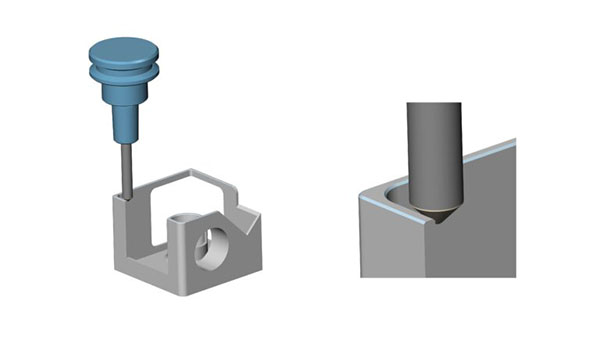
For instance, users can now define a fixed contact point on the tool that enables the cone and cylinder to be used for deburring. This capability makes deburring an attractive option for chamfering because the cone and cylinder leave no imprint of the tool’s profile. To ensure a uniform chamfer, the tool is not tilted. Instead, to avoid collisions, the tool path is automatically trimmed in the affected areas.

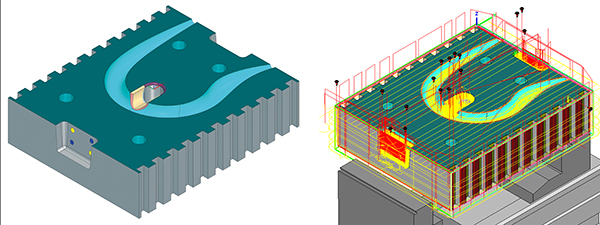
The new 2D roughing algorithms prevent corner roll, which preserves sharp corners and providers greater control over the tool path when machining prismatic shapes. Notably, the ModuleWorks tool-path algorithms offer lower feed rates for machining corners. Decelerating the tool when machining sharp corners enhances surface quality and helps low-end CNCs to handle high-performance tool paths.

ModuleWorks’ collision checker algorithm now returns the approximate point of contact between two objects. This function enables OEMs to offer an enhanced user experience in their simulations, for example by drawing a sphere or other shape to graphically indicate the approximate area of the collision.

Last but not least, the ModuleWorks ‘Machine Builder’ now supports the ‘Smart Measure’ module for measuring distances between any on-screen geometry. Smart Measure automatically recognises different geometric features and their inherent dimensions, making it easier to create machine models.

For further information
www.moduleworks.com

Automation with hyperMill is growing trend

CADCAM specialist Open Mind has identified rapid growth with its automated program generation. In fact, the company estimates that the number of automation projects among users of the hyperMill CADCAM suite tripled in 2020. At the same time, demand for hyperMill Automation Center Advanced has increased significantly.

“The more powerful that machining centres and tools become, the more often CAM programming becomes a bottleneck,” explains Rico Müller, project manager for CADCAM automation at Open Mind Technologies AG. “Companies are looking for solutions that allow them to make their CAM programming more efficient by automating processes. Even the most complex and diverse workpieces are created based on a large number of similar operations that can be standardised. In hyperMill, tool databases, feature recognition and macros for standardisation have been available for some time. However, they are now being more commonly adopted across the manufacturing industry to automate CAM program creation.”

Even the basic version of hyperMill Automation Center allows users to automate the job list creation process, and select and position clamping devices. In addition, a uniform process can be defined for all programmers. The Advanced version makes it possible to define and standardise even complex processes, where the solution primarily focuses on the individual elements of a CAD model. Here, the steps for data preparation and programming, right up to simulation and NC program generation, can all be defined.

Once a manufacturing process has been defined, it can be applied to any new component and executed automatically. If any decisions cannot be made with complete certainty within the automated process, the user is prompted to make the relevant choices during the program run.

For further information
www.openmind-tech.com

Streamlined manufacturing process

Mastercam Mill offers expanded machining flexibility and an increased emphasis on speed and automation. Multi-axis features, 3D enhancements and 2D high-speed tool paths combine with dozens of additional new enhancements in a software package intended to improve shop-floor productivity.

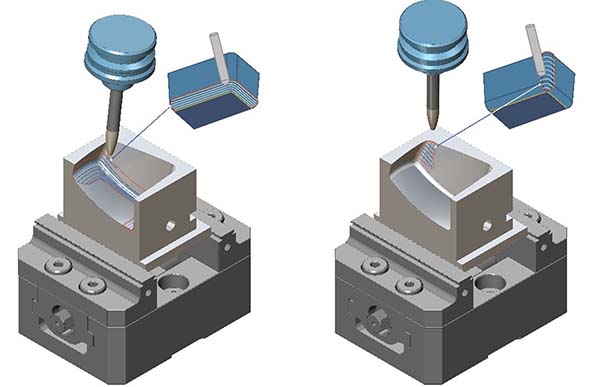
For example, maintaining climb and conventional machining is crucial for surface finish and tool life. For this reason, tool paths now provide constant control of climb or conventional cutting even while in complex areas that would require use of both sides of the tool.

In addition, multi-axis roughing has been enhanced and renamed to multi-axis pocketing, which includes new options such as undercut roughing, wall finishing and floor finishing. Multi-axis pocketing provides greater control of the tool contact point and machining angle when using ‘Accelerated Finishing’ tools and ensures that users get the best possible motion.

The new unified multi-axis tool path allows users to select multiple pieces of input geometry to generate the tool-path pattern. Then, using those geometry choices, the tool path picks the best algorithm to calculate the path.

Mastercam’s 3D high-speed blend tool path includes many enhancements, including the ability to keep created passes equidistant in 3D by adding cuts in steep areas and the capability to set the exact number of cutting passes. Furthermore, by applying automatic and custom angles to raster tool paths, Mastercam now automatically sets different angles to maximise the length of the cut pattern and/or minimise the connecting moves.

Finally, advanced drill, a new tool path, is a customisable multi-segment drill cycle that is useful for spot drilling, deep-hole drilling and back spot facing.

For further information
www.mastercam.com

Faro releases RevEng Software 2021

Faro RevEng Software 2021, the latest update to the company’s RevEng software platform, features automatic surfacing capabilities (NURBS), creating surfaces quickly and directly from scanned point clouds and meshes. As a reverse engineering scan-to-CAD software solution, the system is suitable for aftermarket design, the creation of replacement parts, new design iterations or additive manufacturing.

The ‘Automatic NURBS (Non-Uniform Rational B-Spline) Surfaces Creation Tool’ allows for the creation of a full network of curves and surface patches at the click of a button, ready for immediate export into a CAD file. Full control is also possible by customising the surface patches in the sketch mode with its flexible control point placement, while curves are colour-coded to quickly verify surface continuity. The 3D point cloud capture enables users to create models up to 1.75x lighter with a grid management feature to obtain clean, light and consistent point cloud data.

“Reverse engineering with RevEng is easier and faster than ever,” says John Chan, Faro software product marketing manager. “Users can scan with a Faro ScanArm – paired with the optional eight-axis rotating platform to increase acquisition speed – to generate a high-quality mesh and quickly produce exportable CAD surfaces for machining, FEA simulations or 3D modelling.”

According to Faro, users can also import point cloud or mesh files from any source and repair the mesh with RevEng optimisation tools, automatically repairing meshes up to 20x faster than current leading tools and improving smoothing effectiveness up to 1.5x faster. This makes RevEng software agnostic, ensuring it can be paired with any inspection program.

For further information
www.faro.com